
Custom Domain Setup
Last updated
Connect a domain you already purchased and manage — apex or subdomain.
Ploy supports custom domains for all published sites. You can connect an apex domain (e.g. yourdomain.com) or a subdomain (e.g. docs.yourdomain.com). Ploy handles SSL certificate provisioning automatically.
Ploy does not need to become your domain's DNS manager or take over your nameservers. You stay in full control of your DNS — all that's required is pointing your A and CNAME records to the values Ploy provides. Everything else (SSL provisioning, hostname routing) happens automatically once those records are in place.
When you begin to connect the domain, Ploy will actively watch your DNS record changes for the following 30 minutes. If you need more time to purchase a domain or update your DNS records, make sure to return to the setup screen to perform a Ploy SSL certificate and hostname record sync.
Plan allowances
Custom domain allowances are counted by domain family:
- Free: 0 custom domain families
- Starter: 1 custom domain family
- Pro: 5 custom domain families
- Enterprise: unlimited custom domain families
A domain family is one registrable apex. The apex, www, and all of its subdomains count together as one family. A second registrable apex uses another allowance. Removing every hostname in a family frees that allowance.
If you can't add another domain. When you add a domain that your plan can't take, Ploy shows why instead of the routing step. If your plan does not include custom domains, upgrade to connect the domain yourself, or book a call for assisted setup. If you have used all your domains, remove one you no longer use, or upgrade to a plan with more. On Enterprise, email sales@ploy.ai for a larger allowance. Adding a subdomain of a domain family you already have does not use another allowance.
See the pricing page for current plans.
Prefer the command line? Use ploy domain list|add|status|remove against the site selected by ploy site use. See Custom domains in the Ploy CLI for the complete workflow.
If for compliance or security reasons you must retain full control of your domain throughout the setup process, contact sales@ploy.ai for a pre-implementation consult before getting started.
Desktop browsers recommended. The domain setup flow is designed for macOS or Windows desktop browsers. You'll be managing multiple tabs and auth sessions across your DNS provider, Ploy dashboard, and possibly other cloud services. iPads and tablets may work but are not officially supported for this flow.
Domain Setup Dashboard
Find the Domain Setup Dashboard by navigating to Sites in the left nav bar, then opening Settings → Hosting. From there you can track verification status, trigger a DNS sync, provision your SSL certificate, and manage or remove the domain.


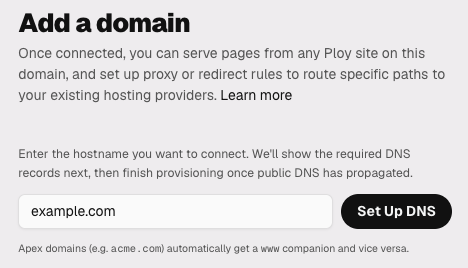
If the site has no custom domain yet, Hosting shows two choices: Buy a new domain and Connect a domain you own. If the site already has a domain, select Add domain to open the same choices. Only owners and admins can add domains. Publish the site to production first; until you do, Hosting shows "Publish your site to production to connect a custom domain" and the choices are disabled.
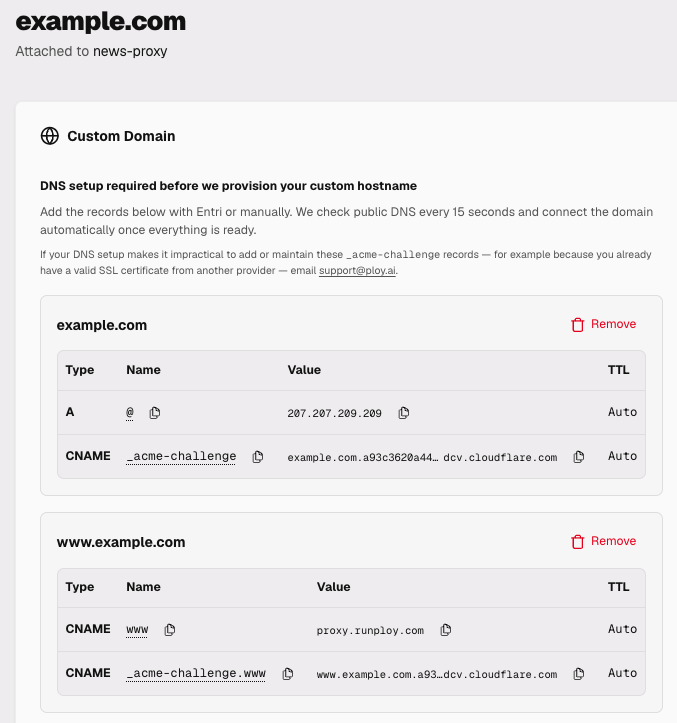
SaaS Providers with Per-Customer Sub-Domains
Quick Setup (Automatic)
If Ploy detects your domain is managed at one of the compatible providers, we integrate with Entri for one-click domain setup — no manual DNS record editing required.
- Go to Sites in the nav bar, then select the site for your domain.
- Open Hosting. If the site has no custom domain, the setup choices appear on the page. If it already has one, select Add domain.
- Under Connect a domain you own, enter your domain and select Set Up DNS.
- Choose Automatic Setup (where available) and follow the Entri flow.
- Ploy configures DNS and provisions SSL automatically.
To manage a domain you already connected, select Manage on its row in Hosting.
Manual DNS Setup
If automatic setup isn't available for your registrar, configure DNS manually. Use the DNS Setup Reference to generate the exact records for your domain.
For advanced configuration options — including reverse proxy setup, subdomain routing, and fallback origins — see the Advanced Setup guide.
Most companies transfer their domain to Ploy without any issues or downtime — this is the normal path. In the rare case that you have a hard requirement for near-zero downtime during the DNS cutover — think Amazon or Walmart scale, where thousands of transactions per minute mean even a brief propagation gap is unacceptable — Ploy can provide pre-validation instructions so your SSL certificate is issued before you update your DNS records. See Cloudflare hostname pre-validation for the technical background, and contact sales@ploy.ai if you need this for your setup.
DNS configuration varies by your DNS provider. Your DNS provider is often where you registered your domain, but may not necessarily be your current DNS provider (example). During Custom Domains setup in Ploy, we will auto-detect well known DNS providers for your domain and help you with automated setup where available. Here are quick links for common DNS providers:
- Cloudflare — Manage DNS records in the Cloudflare dashboard. Make sure to set proxy status to "DNS only" (gray cloud).
- GoDaddy — Add records in the DNS Management section of your domain settings.
- Namecheap — Navigate to Manage DNS in your Domain List management panel.
- Porkbun — Edit DNS records from the domain management page.
- AWS Route 53 — Create a new record set in the hosted zone for your domain.
- Google Cloud Run DNS — Add a resource record set on your Cloud DNS zones page.
- SiteGround — Manage DNS records from your SiteGround account.
SSL Certificates
SSL certificates are provisioned automatically after DNS verification of the _acme-challenge records. This typically takes a few minutes but can take up to 24 hours for DNS propagation.
Tip: Keep the Ploy domain setup page open for the best go-live experience. While the domain setup page in your Ploy dashboard is open, Ploy actively watches for DNS changes and will bring your domain live as soon as all DNS criteria are met. If you close that page, liveness checks fall back to background polling every few minutes. If even a brief delay is unacceptable, leave the dashboard page open until the domain shows as Live.
If SSL isn't issuing after your DNS has verified, work through the following:
- Still seeing a browser SSL warning after Ploy shows the certificate as issued? — Your local machine or browser may be caching the old state. See the Troubleshooting section below for DNS cache-busting steps — including how to flush your browser, OS, and Cloudflare's public DNS cache.
- Wait up to 1 hour after DNS confirms before troubleshooting further — certificate issuance is automatic but not instant. If you want to accelerate verification, use the Cloudflare Purge Cache tactic in the Troubleshooting section below to flush stale DNS from Cloudflare's resolvers first.
- Dashboard shows issued but browser still warns? — use the cache-busting tactics in the Troubleshooting section below (browser DNS flush, VPN, or Cloudflare Browser Run) to verify. Your local cache may be serving the old state.
- Cloudflare users — set your proxy status to "DNS only" during setup. "Flexible" SSL mode causes conflicts.
- CAA records — if your domain uses CAA (Certification Authority Authorization) records, make sure they allow Google Trust Services, which is the default certificate issuer for the Ploy platform.
Choose a default domain
When a site has more than one domain, such as yourdomain.com and www.yourdomain.com, choose one as the default.
- Open your site, then Hosting.
- On a Live domain, select Set as default domain.
Every other domain on the site then redirects (308) to the default, and their routing rules stop applying. To undo this, select Clear default domain. Publish again after you change the default so your canonical tags and sitemap use it. You cannot remove the default domain until you clear it or choose another default.
Troubleshooting
- Ploy shows "Live" but you still see old content — This is a stubborn one, and it's not your fault. DNS changes involve several independent caching layers — your OS resolver, your browser, your ISP, and Cloudflare's own global network — each with its own TTL. Your local machine or browser may still be serving cached records even after Ploy confirms propagation and the rest of the world can reach your site. To verify from a clean, remote perspective, use Cloudflare Browser Run's Live Session — a cloud-hosted browser that resolves DNS independently of your Mac or local network cache, so you can confirm what the rest of the world actually sees. Alternatively, enabling a desktop VPN can also route your DNS queries through a different resolver and effectively bust out of your local cache without running any commands.
Don't roll back your DNS
This is one of the most common mistakes during domain setup. If Ploy shows your domain as "Live," your DNS update is working — the world can already reach your site. Seeing old content locally is almost always a cache issue, not a DNS problem. Rolling back your DNS records at this point will undo a successful setup and restart the clock on propagation. If you're seeing a Cloudflare error page instead, check the 1001, 1034, and other 1xxx error entries below before making any DNS changes.
- Chrome / Edge / Brave and most Chromium browsers — Navigate to
chrome://net-internals/#dnsand click Clear host cache. This clears the browser's own DNS cache independently of your OS. - macOS — If you're comfortable running terminal commands, flush your local DNS cache:
sudo dscacheutil -flushcache && sudo killall -HUP mDNSResponder - Windows — Open Command Prompt as Administrator and run:
ipconfig /flushdns - Linux — Depends on your distro's DNS resolver. Common options:
sudo systemd-resolve --flush-caches(systemd) orsudo service nscd restart(nscd).
- Chrome / Edge / Brave and most Chromium browsers — Navigate to
- Domain shows DNS mismatch. Ploy's latest DNS lookup found a value that does not point to Ploy. The domain detail page shows the value it found. DNS changes can take up to 24 hours to settle, and lookups can switch between old and new values in the meantime. If you changed DNS in the last 24 hours and your site is live and working, you can ignore this message. If you rolled back your DNS on purpose, you can remove the domain from the ⋯ menu. Otherwise, check again later.
- DNS changes not reflecting after saving — Ploy uses Cloudflare's DNS resolvers, so stale cached records can prevent your domain from connecting even after a correct DNS update. Purge Cloudflare's public DNS cache at one.one.one.one/purge-cache. Enter your root domain (e.g.
your-domain.com) with Record Type A and click Purge Cache, then repeat with your www subdomain (e.g.www.your-domain.com) and Record Type CNAME. Only do this after you have saved the DNS update.- Tip: switch your system DNS to 1.1.1.1 — For the most consistent view with Ploy's infrastructure, configure your device to use Cloudflare's
1.1.1.1resolver. This means your machine resolves DNS the same way Ploy does, eliminating resolver-based discrepancies: macOS, Windows, Linux, Router (whole network).
- Tip: switch your system DNS to 1.1.1.1 — For the most consistent view with Ploy's infrastructure, configure your device to use Cloudflare's
- Cloudflare "1001" error page. Right after you point your records at Ploy, Cloudflare can show this page while it checks that you own the hostname. Ploy asks Cloudflare to check again as soon as it sees your records on Ploy, so the page usually clears within a few minutes. Keep the domain setup page open, or select Check Readiness from the ⋯ menu on the domain card. Don't roll back your DNS unless the error lasts more than 30 minutes. If you started the setup a long time ago and the setup page shows Check DNS now, select it to finish the setup.
- Cloudflare "1034" error page — Your domain may be hosted by another provider that also uses the Cloudflare platform. That provider's hostname entry takes priority and can block the transition to Ploy's DNS. Common platforms that run on Cloudflare include BigCommerce, HubSpot, Kinsta, Render, Salesforce Commerce Cloud, Shopify, Webflow, and WP Engine — see the full list in Cloudflare's provider guides. Check your prior hosting provider's dashboard and disconnect or remove the domain from their management before re-verifying with Ploy.
- Other Cloudflare 1xxx errors — If you're seeing a Cloudflare error page not covered above, consult the Cloudflare 1xxx Errors guide for per-error troubleshooting hints.
- DNS stuck on "Pending" — DNS propagation can take up to 48 hours. Before assuming it's a propagation delay, double-check the most common mistakes: adding the wrong record type (e.g. an A record where a CNAME is required), a typo in the value, or forgetting to click Save in your DNS provider's dashboard. Verify your records match exactly what's shown in the Ploy dashboard. You can check live propagation status with tools like whatsmydns.net, nslookup.io, Google Admin Toolbox Dig, or dnschecker.org.
- SSL not issuing — See the SSL Certificates section above for a full checklist: propagation wait times, DNS record requirements, Cloudflare proxy settings, and CAA record configuration.
- Moving a domain from Webflow (Cloudflare Orange-to-Orange) — If your domain was previously hosted on Webflow and both Webflow and your new provider use Cloudflare, you may hit an Orange-to-Orange (O2O) conflict that causes redirect loops or SSL errors. See Webflow's O2O guide for details.
Moving from Webflow?
Remove your domain from Site settings > Publishing > Production at least 5 minutes before verifying it with your new provider. This prevents an Orange-to-Orange conflict where Webflow's Cloudflare hostname entry blocks the transition.
— Webflow Help: Using Cloudflare Orange-to-Orange (O2O) with Webflow
- Redirect loops — If using Cloudflare with "Flexible" SSL mode, switch to "Full (strict)" or "DNS only" proxy mode.
- "Too many redirects" error — Disable any redirect rules at your registrar/CDN that conflict with Ploy's hosting.
- Connected to the wrong site — If the destination site is in the same organization, use the direct move flow instead of removing the domain. See Moving a connected custom domain to another site.
Moving a connected custom domain to another site
You can move a connected custom domain directly from one Ploy site to another without disconnecting it first. The direct move preserves the existing SSL certificate and avoids the downtime and extra SSL setup that can come with removing and reconnecting the domain.
Before you start
- The domain must already be connected to the source site.
- The destination site must be published.
- Both sites must belong to the same organization.
- You must be an owner or admin.
- The destination workspace must include custom domains.
Move the domain
- Open Sites in the left navigation.
- Select the source workspace and site.
- Open Settings, then Hosting.
- Find the connected domain in the Domains section and select Manage.
- Select Move to another site.
- Choose an eligible published destination site in the same organization.
- Select Move domain and complete the passkey confirmation if Ploy asks for it.
- Open the destination site, then Settings, then Hosting. Verify that the domain appears there and serves the destination site.
Do not remove the domain first
Removing the domain can interrupt traffic and may require Ploy to set up SSL again. Use Move to another site whenever the destination is eligible.
If the connected domain is an apex domain and it has a connected www companion, Ploy moves both hostnames together.
Cancel a Domain Setup
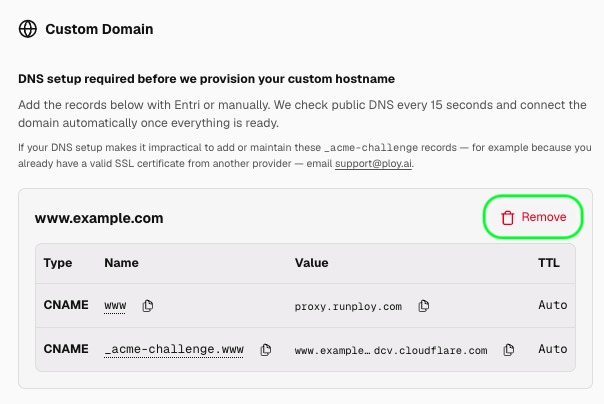
If you started a domain setup but haven't finished adding DNS records, you can cancel it by clicking Remove on the domain row in the DNS setup screen. This removes the pending hostname without affecting your live site.
To put only one hostname of a pair on Ploy, for example www while your apex stays with another host, select Remove on the other hostname's row before you connect. Ploy then checks DNS only for the hostname you keep, so you add only its _acme-challenge and routing records. The removed hostname is not connected to Ploy and keeps serving from its current host.
Remove a Domain
To remove a custom domain from your site, go to Sites in the nav bar and select your site. Navigate to Settings → Hosting, find the domain row, and click Manage. From the domain setup dashboard, select Remove Domain. This action causes immediate downtime — removing a domain disconnects Ploy's hosting records instantly, so the domain will stop serving your site as soon as it is removed.
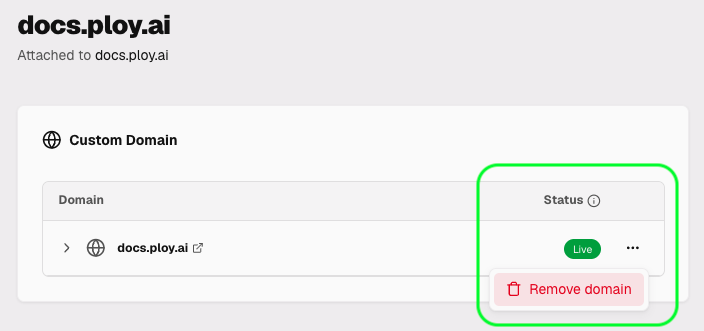
Removing a domain immediately stops Ploy from routing traffic for it. If you plan to point the domain elsewhere, make sure your DNS records are updated away from Ploy's values before or immediately after removal to minimize downtime.
Migrating from Vercel or Next.js
A Next.js rewrites() rule that forwards a path to another origin becomes a Ploy proxy routing rule. Match the incoming path with pathPrefix or pattern, then use an action with type: "proxy", the upstream originUrl, and the appropriate preserveHostHeader setting.
Ploy does not provide an equivalent of Vercel's x-vercel-ip-country request header. If your Next.js application branches on that header, replace the behavior before moving traffic.
Running Ploy alongside another site?
If you already have a site on Webflow (or another host) and want to serve Ploy-built pages at specific paths on the same domain, see Domain Routing Rules — Ploy acts as a reverse proxy, serving your pages directly and forwarding everything else to your existing site.
What's Next?
- Go live — Follow the Publishing & Deploys guide to publish your site.
- Hybrid setup — Use Routing Rules to serve Ploy pages alongside an existing site.
- Troubleshoot — Check the FAQ & Troubleshooting page for more common issues.
- Need help? — Email support@ploy.ai for DNS and domain issues.