
Webflow
Last updated
Proxy traffic from your Ploy-hosted domain to an existing Webflow site during your migration.
Webflow doesn't expose a stable origin URL by default — sites are served only on the domains you've added in Webflow's hosting settings. To proxy traffic from Ploy, you'll bind a dedicated origin subdomain on Webflow first, then point the routing rule at it.
← Back to Fallback Origins
Add an origin subdomain Ploy can proxy to
- Go to webflow.com/dashboard.
- Find your site card, click the overflow
···icon, and choose Settings. - At a URL like
https://webflow.com/dashboard/sites/<your-site-name>/general, find Publishing in the left nav bar. - Follow Webflow's instructions to set up a
www2.your-domain.comcustom domain. - Complete Webflow's verification flow — add the TXT and CNAME records Webflow shows you at your registrar, wait for DNS to propagate, then click Verify domain. Once verified and published, your existing Webflow content will be served at
www2.your-domain.com, which is the hostname Ploy proxies to from your primary domain. - If you have a default domain selected for your site, go to the Publishing page and click Remove default.
- Removing the default will now reveal
www2.your-domain.comas a publishable domain in the site editor. Select its checkbox and hit Publish to warm up this domain's contents. - In the next few minutes, visit
https://www2.your-domain.comand confirm the browser stays at that URL and does not redirect towww.your-domain.com. Why does this matter? - Your desktop browser may have cached prior redirect behaviour, so test any change in an incognito / private browsing window first. If that still looks wrong, try a different browser on the same computer. For the most reliable signal, test on a different device entirely — a teammate's computer, your phone, or a remote browser service.
Before continuing, open
https://www2.your-domain.comin your browser and confirm your Webflow site loads there over HTTPS. SSL issuance and DNS propagation can take a few minutes — only resume the Ploy routing rules setup once the origin hostname is serving traffic.
Point a Ploy routing rule at the origin
For any Ploy Routing Rules that need to proxy pages to your pre-existing Webflow site, paste https://www2.your-domain.com into the routing rules editor without a trailing slash.
If you want your existing Webflow site to handle anything that doesn't match a routing rule above (e.g. Ploy serves /blog, Webflow serves the rest of the site), enable Default fallback proxy and point it at https://www2.your-domain.com. Keep Preserve Host header on — Webflow routes by the incoming Host header, so your primary domain needs to come through as-is.
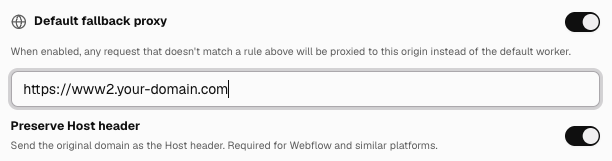
Tip: If you've removed the Webflow default domain and
www2.your-domain.comis still redirecting towwwwhile DNS propagates, you can temporarily set the fallback proxy value tohttps://yoursite.webflow.io. Switch back tohttps://www2.your-domain.comonce that domain stays put and no longer redirects towww.