
Framer
Last updated
Proxy traffic from your Ploy-hosted domain to an existing Framer site during your migration.
← Back to Fallback Origins
Find a stable Framer origin URL
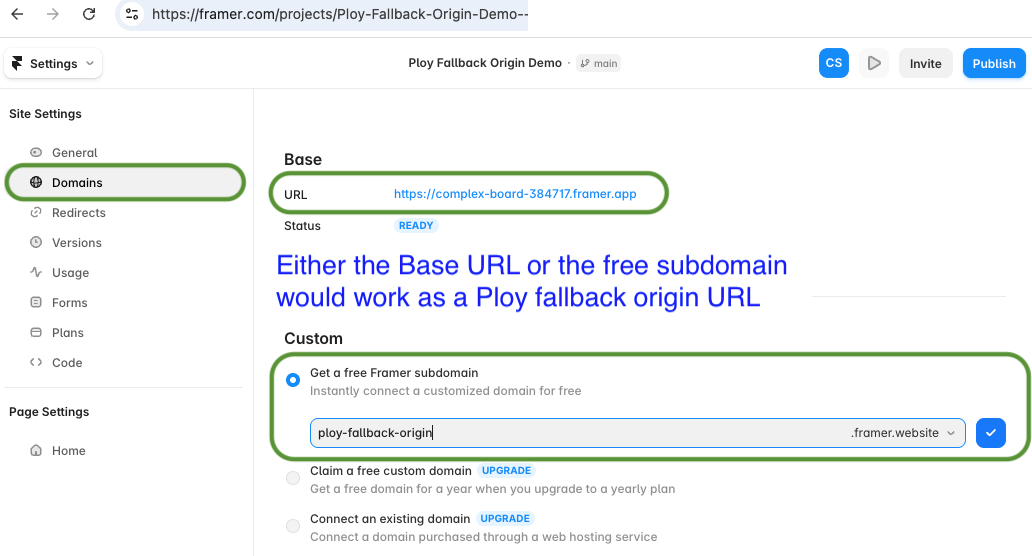
- Go to your Framer project's Settings, then Domains.
- Find either:
- the free Framer subdomain (under Custom > Get a free Framer subdomain), or
- the default issued Base URL (a
*.framer.applink, shown at the top under Base).
Either one works as a Ploy fallback origin URL — both stay stable regardless of what custom domain is attached to the project.
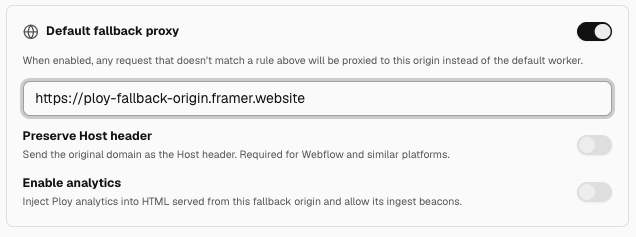
Framer as Default fallback proxy
Use the default fallback proxy when you want to start slow on Ploy — building out a few pages at a time (e.g. Ploy serves /blog) and deferring to Framer for everything else during your transition. You can also keep this hybrid setup permanently if you don't need to migrate every page over. Enable Default fallback proxy and point it at the same URL.
Point select Ploy routes at Framer origin
For any Ploy Routing Rules that need to proxy pages to your pre-existing Framer site, paste that URL into the routing rules editor's Origin URL field. Use the fully-schemed Framer URL without a trailing slash, for example https://ploy-fallback-origin.framer.website.
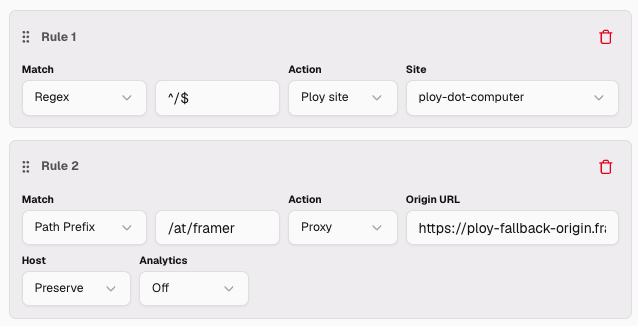

In this example, any route that matches the prefix /at/framer will serve from Framer. In the example page below, the page is served by Ploy but the content is proxied through to Framer, so it renders as if it came straight from your Framer site:

Troubleshooting
- The Preserve Host header setting appears to have no effect on Framer's ability to return content to the proxied pages. This may change over time depending on Framer's configuration, so toggle it if your page isn't proxying as expected.