
Lovable
Last updated
Use these setups to transition your site to Ploy, but we highly recommend you migrate all pages to Ploy.
← Back to Fallback Origins
Find a stable Lovable origin URL
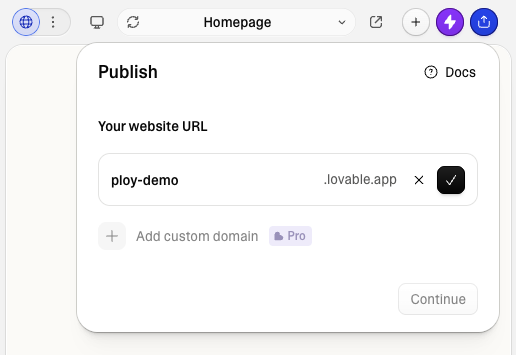
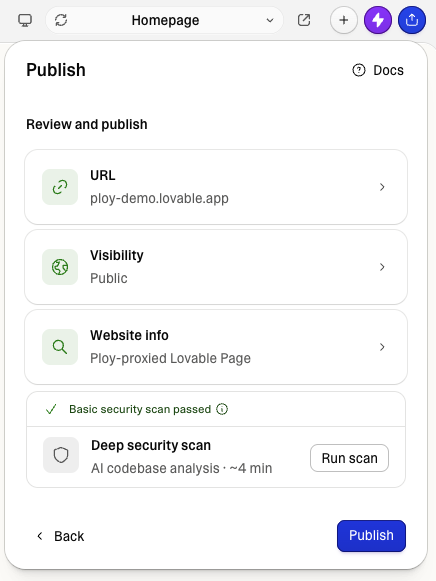
- Open your project in Lovable and click Publish in the top bar.
- Under Your website URL, copy the free subdomain Lovable assigned your project — it looks like
your-project.lovable.app. - This is the origin Ploy will proxy to, and it stays put even if you later add a custom domain in Lovable.
Lovable as Default fallback proxy
Recommended over path-specific routing. Use the default fallback proxy when you want to start slow on Ploy — building out a few pages at a time (e.g. Ploy serves /blog) and deferring to Lovable for everything else during your transition. You can also keep this hybrid setup permanently if you need some backend functionality at other vendors. That said, we suggest fully transitioning to Ploy when you can — running a hybrid setup indefinitely means paying for unnecessary subscriptions.
Enable Default fallback proxy and point it at your Lovable origin URL (see above for how to find it).
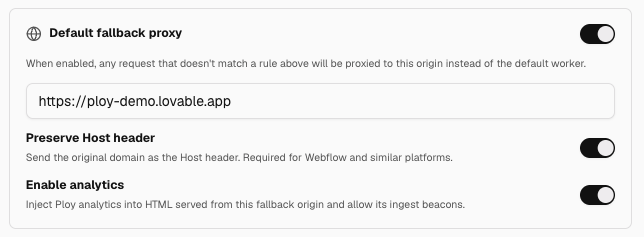

Point select Ploy routes at Lovable origin
We don't recommend this method. Unlike the default fallback proxy above, path-prefix proxying only forwards requests under that prefix — it doesn't automatically catch Lovable's static CSS/JS assets, which are served from paths Lovable controls. To make this work, you have to prompt Lovable (or configure its Vite site directly) to serve static assets from a distinguishable prefix like /assets-lovable, then add that same prefix as a second Ploy proxy rule so those static assets also come through the proxy. If you skip that step, the proxied page will load without its styles or scripts. The complexity and web development knowledge required to execute this is out of scope for Ploy's audience, and we don't provide solutions engineering for other vendors' setups.
For any Ploy Routing Rules that need to proxy pages to your pre-existing Lovable site, paste that URL into the routing rules editor's Origin URL field. Use the fully-schemed Lovable URL without a trailing slash, for example https://your-project.lovable.app.
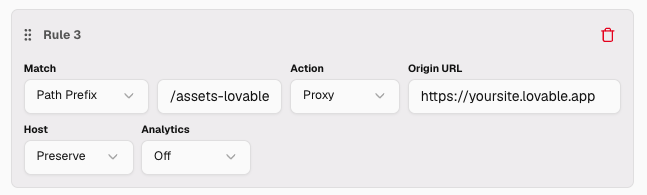
An additional rule to capture Lovable's static assets — but only if you prompted Lovable to serve them at a distinguishable prefix.
In this example, any route that matches the prefix will serve from Lovable — the page is served by Ploy but the content is proxied through to Lovable, so it renders as if it came straight from your Lovable site (see the demo screenshot under "Lovable as Default fallback proxy" above).
Troubleshooting
- The Preserve Host header setting appears to have no effect on Lovable's ability to return content to the proxied pages. This may change over time depending on Lovable's configuration, so toggle it if your page isn't proxying as expected.