Ploy AI Gateway
Use AI models from OpenAI, Anthropic, ElevenLabs and other providers on your website and in Ploy's Agent's work. You don't need an API key or a provider account. Every call uses your Ploy credits.
You don't need to pick a model or write the code. Ask Ploy's Agent for the result you want. It decides where AI helps, chooses a model that fits the job, and builds it.
Two ways to use it
- On your published site. Add AI features your visitors use, such as a support chatbot, search that understands questions, or image and audio tools. This spend shows as Website AI on your Usage screen.
- In Ploy's Agent's own work. Ploy's Agent writes and runs a script that calls models directly, for jobs like tagging every row in a table, transcribing a video, or writing a summary for each account. These calls use your workspace's AI credits as part of the chat.
What you can do
| Model type | Use it for |
|---|---|
| Text | Chat replies, summaries, rewrites, and pulling structured fields out of text |
| Decisions | Tagging, classifying, routing or scoring items with fixed answers, such as yes or no, one of your options, or a score. Faster and cheaper than a text model. |
| Embeddings and reranking | Search by meaning over your pages and PloyDB content |
| Images | New images, or edits that follow a reference image |
| Speech and music | Voiceover from text, and instrumental music from a prompt |
| Transcription | Text from audio, with word timings and speaker labels |
Video generation and realtime (live voice) models are not available through Ploy AI Gateway.
Examples
A support chatbot that knows your whole site
Add an AI assistant like Ask Ploy, the chat on ploy.ai and these docs. Ask Ploy's Agent, for example: "Add a support chatbot that answers questions from everything on our site." It builds the chatbot in three parts:
- Search by meaning. An embedding model indexes the content of every page on your site, plus any PloyDB content you choose. When a visitor asks a question, the chatbot finds the passages closest in meaning, even when the visitor uses different words than your pages do.
- Answers from a language model. The model replies using only those passages, so answers stay grounded in your content. When your site doesn't cover a question, the chatbot says so and offers your contact form.
- Conversations saved in PloyDB. Every conversation goes into a PloyDB table. Ask Ploy's Agent what visitors ask most, which questions your site can't answer yet, and which objections come up before people sign up. Then use those answers to improve your pages.
Internal tools and workflows
Ploy's Agent also calls models from its own scripts while it works for you. Costs are for the model calls only.
- Sales call summaries: labeled 275 sales calls and summarized 34 customer accounts for under $1.
- Fact-checking: checked 1,038 draft profiles against their sources for $1.78.
- Video ad audio: made the voiceover, music and caption timing for a set of short video ads for $0.07.
- Blog header images: in a test with 290 blog posts, made 6 on-brand samples, then estimated about $1.70 for the remaining 284.
Costs and approvals
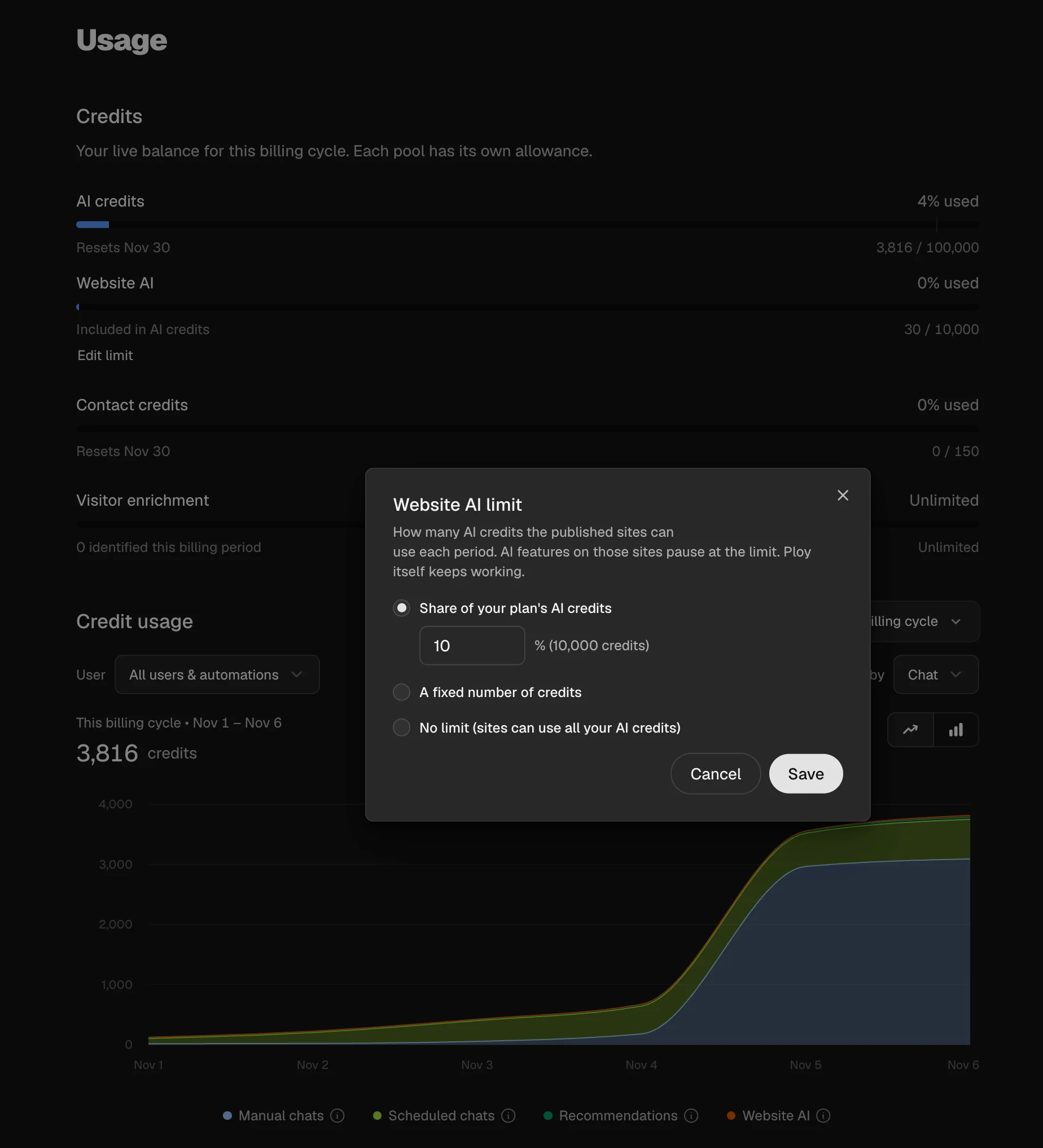
- Site features use your plan's AI credits. By default, each workspace's published sites can use up to 10% of your plan's AI credits each period. Owners and admins can change this with Edit limit under Website AI on the Usage screen. See Credits.
- Ploy's Agent's jobs use your workspace's AI credits, like the rest of the chat. Before a big job, it runs a small sample, shows you the results and a cost estimate, and waits for your yes. A scheduled Ploybook that asks for the job counts as approval.
- If credits run out during a job, the script saves its progress and stops. Ploy's Agent tells you how many items are done, and picks up from there after you add credits.
Limits
- Site AI features work in the editor preview and on your published site, on Preview or Production. They use your AI credits and count toward your Website AI limit wherever they run.
- Routes that write to PloyDB, such as saving a chatbot conversation, still need a Preview publish to test. See Publishing & Deploys.
- Unpublishing or deleting a site turns off its AI features.
- When sites reach their Website AI limit or your organization runs out of AI credits, AI features on your sites pause and owners and admins get an email. Ploy itself keeps working at the limit. Visitors see a friendly fallback, such as a link to your contact form.
For developers
Ploy sites include ploy.ai.mjs at the project root. Its createPloyAi function returns an AI SDK provider, so you call models with the normal AI SDK functions, such as generateText, streamText, embed, generateImage, generateSpeech and transcribe. Sites need the ai package, version 7 or later.
- Put every route that calls a model under
/ploy-ai/. Calls from any other path are refused. - Call models only from server code, never from the browser.
- Ploy adds
PLOY_AI_URLandPLOY_AI_KEYwhen you publish, on Preview and Production. These names are reserved. Never log or return the key, and don't add your own provider keys. - Model IDs use the
provider/modelformat, such asopenai/gpt-6-luna-fast. - Set the model, instructions and output limit in your route. Never accept them, or a message history, from the request body, since anyone can call a public route.
// src/pages/ploy-ai/answer.ts
import type { APIRoute } from "astro";
import { env } from "cloudflare:workers";
import { generateText } from "ai";
import { createPloyAi, SiteAiUnavailableInPreview } from "../../../ploy.ai.mjs";

export const prerender = false;

export const POST: APIRoute = async ({ request }) => {
  try {
    const { message } = await request.json();
    if (typeof message !== "string" || message.length > 2000) {
      return Response.json({ error: "invalid" }, { status: 400 });
    }
    const ai = createPloyAi({ request, env });
    const { text } = await generateText({
      model: ai.languageModel("openai/gpt-6-luna-fast"),
      instructions: "Answer in one short paragraph.",
      prompt: message,
      maxOutputTokens: 300,
    });
    return Response.json({ text });
  } catch (error) {
    if (error instanceof SiteAiUnavailableInPreview) {
      return Response.json({ error: "preview" }, { status: 503 });
    }
    return Response.json({ error: "unavailable" }, { status: 503 });
  }
};
Error responses:
| Status | Meaning |
|---|---|
402 | Out of AI credits, or the Website AI limit is reached |
429 | Too many calls in a minute. The AI SDK retries. |
403 | The site is not published, or Website AI is paused for it |
401 | The site key is out of date. Publish the site again. |
503 | Briefly unavailable. Try again. |
Show a fallback, not the error. Once a streamed reply starts, any of these errors reaches the browser only as a general stream error. Show visitors a friendly message with a way to reach you.