
Ploy Lite
Last updated
A choice for straightforward, focused work.
Choose Ploy Lite for focused requests such as research, analysis, and focused implementation.
When to use Ploy Lite
Choose Ploy Lite when the request is small, specific, and easy to verify. For example:
- Validate a question — review a focused question and check it against the information available in your workspace.
- Draft a response — prepare a concise reply based on your documentation or other workspace context.
- Make a small adjustment — refine wording, spacing, styling, or another tightly scoped part of existing work.
A useful rule: if you can describe the change in one clear sentence and it affects a small part of the work, Ploy Lite is usually a good fit.
When to ask for Ploy Agent
For complex, multi-part work, choose Ploy Agent. Choose Ploy Ultra only when you explicitly want it for unusually demanding work.
Choosing a profile for delegated work
For straightforward, focused delegated work such as research, analysis, and focused implementation, you can ask for Ploy Lite. For complex, multi-part delegated work, you can ask for Ploy Agent. Choose Ultra only when you explicitly want it for unusually demanding work.
How to select Ploy Lite
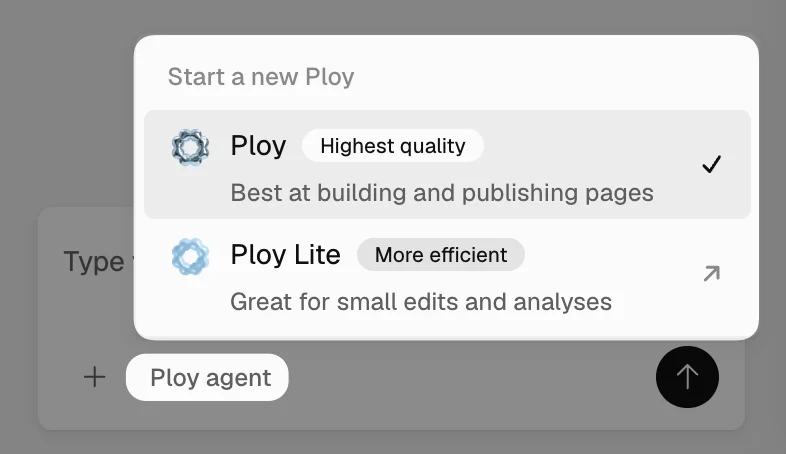
- Start a new chat, or open an existing one.
- Open the agent picker in the message composer.
- Select Ploy Lite.
- Describe the focused task you want completed.
If a request grows into complex, multi-part work, switch the chat to Ploy Agent in the agent picker. The conversation carries over. If Ploy Lite cannot do part of a task, it asks you to make this switch.